bGamma Software Updated to Version 1.7.2
More insight, greater confidence and improved control in gamma‑ray spectrometry
BrightSpec have released bGamma v1.7.2, a significant update to their professional gamma‑ray spectrometry software, focused on improving data quality, analytical confidence and reporting flexibility. This release introduces powerful new spectrum comparison toolsthat allow users to visually overlay and interrogate spectra in real time, making it easier to validate measurements and identify subtle differences between samples. Alongside this, the inclusion of Minimum Detection Limit (MDL) calculations provides greater flexibility when reporting detection capabilities, particularly where efficiency‑based activity limits are not required.
The update also delivers a refined quantification model and reporting workflow, giving users more control over uncertainty handling and report content, while reducing setup time for both routine and advanced analyses. Enhancements to the Efficiency, Peak‑to‑Total and Nuclide Library editors streamline calibration work and improve data exchange between systems, and integration of the new BrightSpec FLINT detector further simplifies hardware‑software connectivity. A range of usability improvements, updated preferences and a revised user manual complete a release designed to support faster, clearer and more reliable gamma‑spectrometry workflows.
Key Highlights in bGamma v1.7.2
Spectrum Comparison Tools
To support better measurement validation and faster interpretation, bGamma now allows direct visual comparison of two gamma spectra within the same plot, helping users quickly identify differences and confirm spectral quality.
What’s new:
- Overlay a comparison spectrum beneath the active spectrum
- Compare by channel number or calibrated energy
- Display intensity as counts or count rate (cps)
- Cursor readout shows values for both spectra simultaneously
- Comparison mode can be shown or hidden instantly via the context menu
- Visual appearance fully configurable via Preferences
- A comparison spectrum can be preloaded when connecting to a device

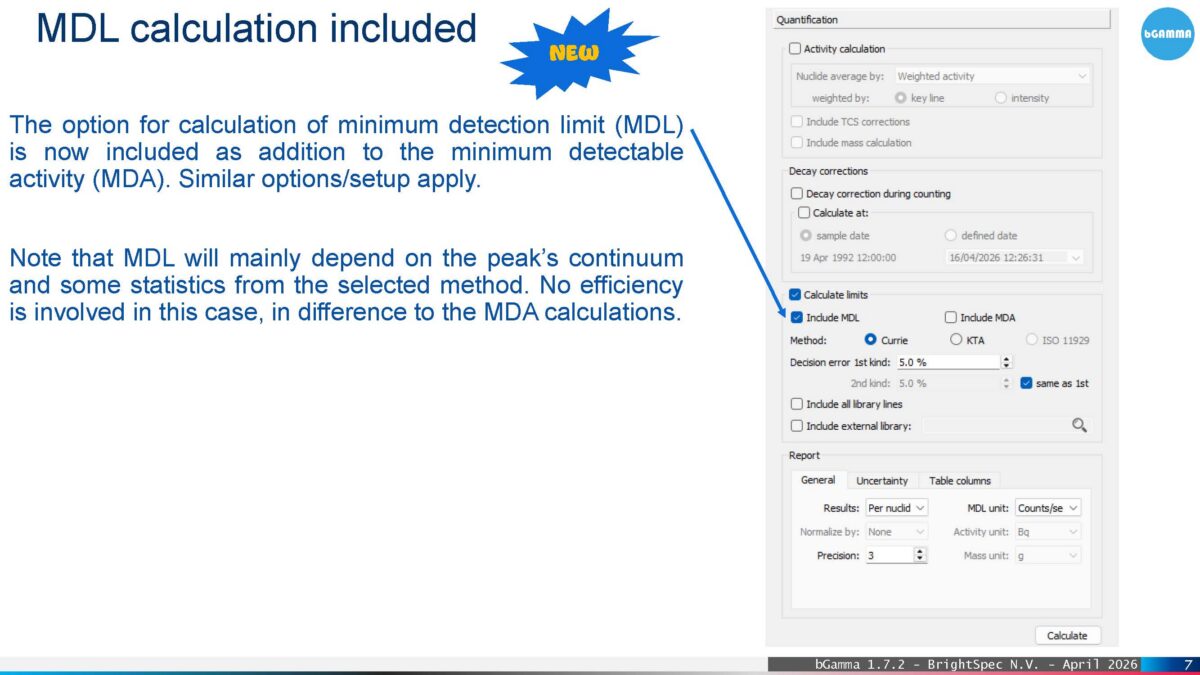
MDL (Minimum Detection Limit) Calculations
For applications where detection capability needs to be assessed independently of efficiency calibration, bGamma now includes MDL calculations alongside existing MDA tools, providing greater flexibility in how detection limits are reported.
What’s new:
- MDL calculation option added to the quantification workflow
- MDL based on spectral statistics and background continuum
- No efficiency data required (unlike MDA)
- Configurable default MDL reporting units
- Dedicated MDL report format
Improved Quantification Model & Reporting
To make complex analyses easier to configure and reports more consistent, the quantification model has been reorganised with clearer structure and greater control over reported outputs.
What’s new:
- Model settings grouped into logical sections
- Options enabled or disabled dynamically based on analysis state
- New uncertainty settings tab, including control over report inclusion and formatting
- New report table column settings, allowing users to select which parameters appear in outputs
Efficiency, Peak-to-Total and Editor Enhancements
Calibration and library management workflows have been refined to reduce setup friction and improve consistency between projects and users.
What’s new:
- Efficiency Editor load controls consolidated into a single action
- Calibration curve legends added, with adjustable positioning
- Energy axis no longer limited to calibration point range
- Zoom and pan added to calibration plots, matching spectrum plot behaviour
- Clear removal workflow for Peak‑to‑Total and Efficiency calibrations
Improved bGamEff Integration
When importing efficiency calibrations, bGamma now provides clearer control over which elements of the calibration environment are applied, reducing the risk of unintended configuration changes.
What’s new:
- Import dialogue displays detector, setup and sample data from bGamEff
- Users can selectively apply setup and detector data
- Optional application of sample data
- Clear prompts before changes are committed
Enhanced Nuclide Library Exchange
To support consistency across systems and teams, nuclide library files now preserve key gamma‑line selections, making shared libraries more reliable and reusable.
What’s new:
- Key‑line flags saved when exporting nuclides to library files (.grad)
- Option to import and propagate key lines when loading a library
- Key lines automatically applied to the local nuclear library
- Fully exchangeable nuclide library files
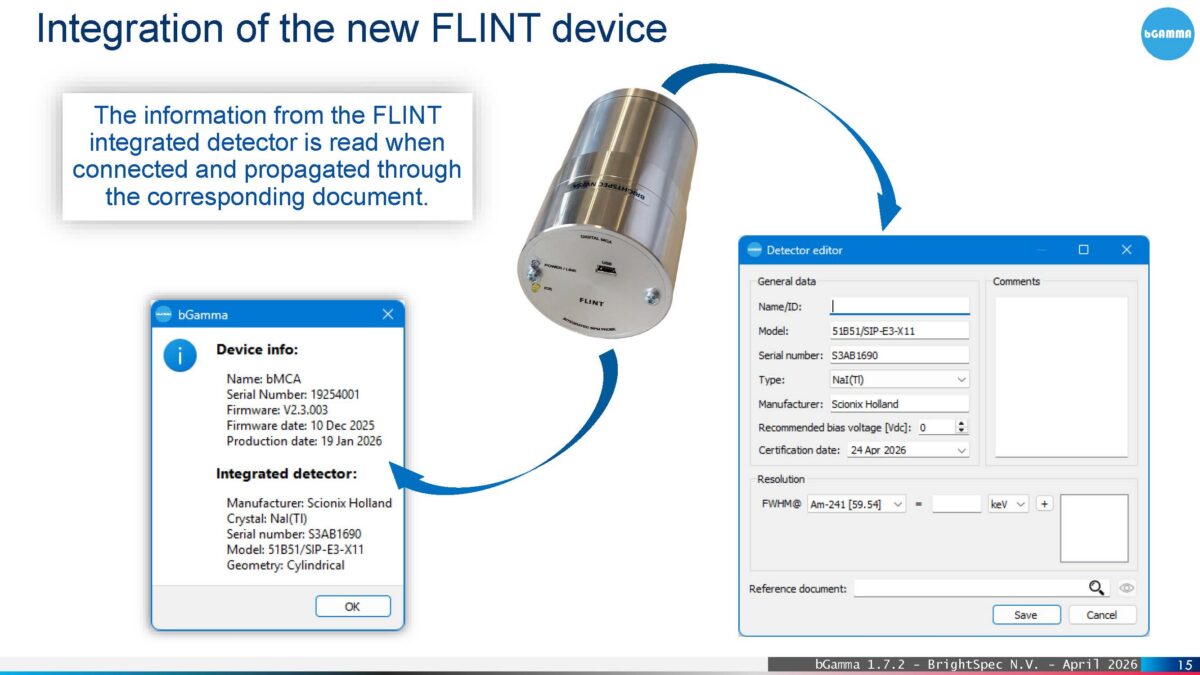
Integration of the BrightSpec FLINT Detector
Support for the new BrightSpec FLINT integrated detector simplifies setup and ensures detector information is correctly applied throughout the analysis workflow.
What’s new:
- Automatic reading of FLINT detector information on connection
- Detector data propagated into the active bGamma document